Simplify premium collection and cut admin work.

Automate billing, manage complex rates, and improve payment reliability.

Automate recurring gifts, reduce churn, and strengthen donor loyalty.

Streamline membership payment process and provide a seamless experience for members.

Streamline tuition payments, lower late fees, and focus on students.

Automate rent collection, handle disputes and arrears, manage deposits.

Online Payments >

Process online payments via PayLinks, Giving Pages and Payment API.

Recurring Payments >

Automate recurring payments with Salesforce at the core.

Agent Payments >

Collect secure payments over the phone or mail using a Virtual Terminal.

Outbound Payments >

Pay vendors faster with tracked outbound payments.

Recover failed payments automatically in Salesforce.

Bank Payments >

Import and reconcile bank payments in Salesforce.

Payment Service Provider Payments >

See all your PSP payment data in Salesforce.

Non-FinDock Processed Payments >

Reconcile all payments in one Salesforce view.

Nonprofit Solutions

Giving Pages

Gift Aid


More

Agentforce

FinDock Factsheet


Insights, tips, and deep dives into payments on Salesforce

Hear directly from customers about their FinDock experience.

Learn how organizations transform their payment operations with FinDock.

Access guides, whitepapers, and resources to explore FinDock.

Find out which events we’re attending and hosting - come meet us in person.

Learn from FinDock experts and partners in live or on-demand sessions.

Get help from our resources or submit a support request.

Understand how to configure, use, and integrate FinDock.

For Customers

Find Implementation Partner >

Find certified experts to implement FinDock successfully.

View Integration Solutions >

Extend FinDock capabilities with out-of-the-box integrations.

For Partners

Become a Partner >

Join our partner ecosystem and deliver payment solutions on Salesforce.

FinDock Academy >

Get trained and certified to build expertise in FinDock implementations.

For Partners

FinDock Demo App >

Launch an end-to-end payment demo in just 5 minutes.

Partner Newsletter >

Stay in the loop with updates, insights, and partner success stories.

Learn who we are and what we strive for.

Access our logos and brand guidelines.

Stay up to date with our latest stories and updates.

Read our policies, terms, and compliance resources.

Explore open roles and join the FinDock team.

Get in touch with our team.

Agent Payments

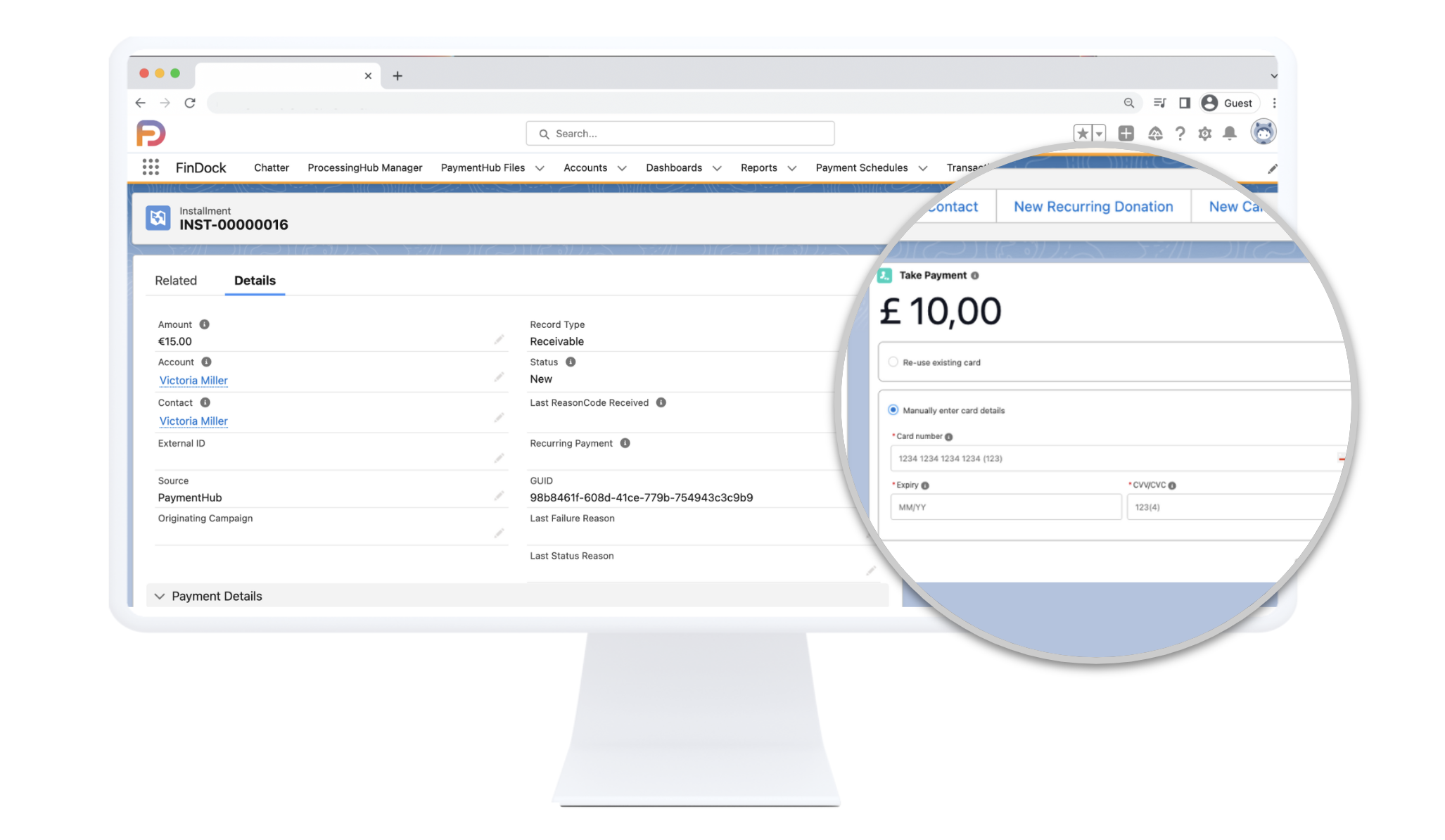
Virtual Terminal (MOTO) for Salesforce – enable your agents to take secure payments in seconds.

Why use FinDock’s Virtual Terminal?

Set up, process & update payments in seconds

Process one-time or recurring card and bank payments, and update payment methods, right from Salesforce. 

Give your customers the flexibility they expect

Whether they phone in, mail a form, or check out online – support any payment method or channel they trust.

Secure by design

Tokenisation, PCI compliance, and role‑based permissions keep card data safe.

Keep agents in Salesforce

A native Lightning component drops into pages and Screen Flows, eliminating multiple open windows and context switching, and slashing clicks and call time.

How does the payment terminal work?

1.Agent accepts payment details

Over the phone

Agents open the Virtual Terminal in Salesforce, enter the caller’s payment details, and process the payment on the spot.

From direct mail

When payment information arrives on paper pledge or order forms, staff simply key the data into the Virtual Terminal to create the payment object.

Face to face marketing

Your fundraisers and field reps collect payment details in person.

With cards and bank accounts on file

If a customer already has a card or bank mandate saved, agents can select that “card on file” in the Virtual Terminal without asking for details again.

2. Agent enters payment details into the Virtual Terminal

Enter amount and payer details

Set the amount and adjust any payer or installment details.

Enter new card or bank account details

Add fresh card or IBAN data securely with real-time validation.

OR

Reuse stored payment method

Select a saved card or mandate and charge it with one click – no re-entry needed.

3.Payment is processed and the status is updated on Salesforce in real time

FinDock submits transaction to your payment service provider

FinDock tokenises and submits the transaction to Stripe, Worldpay or Authorize.net.

Payment status gets updated in real-time

FinDock changes the Installment status to “Collected” in Salesforce the moment your payment service provider confirms the payment.

FinDock is a 100% Salesforce native solution

Compatible with every Salesforce cloud

Seamless integration

FinDock functions as a native Salesforce application, providing a fluid experience within your existing Salesforce environment.

Real-time data

Your Salesforce reports and dashboards reflect up-to-date payment statuses for accurate tracking and analysis.

Strong security

All data within FinDock is secured by Salesforce’s robust security protocols.

Use case #1

Direct-mail appeal: process response slip gifts in one screen

A fundraising appeal is mailed to thousands of supporters. Donors return their reply slips, authorising a $50 one-off gift.

  • The agent opens the donor’s Contact record.
  • In the same window, in the FinDock Virtual Terminal, the agent types the gift amounts, and either selects a saved card or keys in a new card from the slip.
  • FinDock automatically processes the payment in the background and updates the record with the real-time status.
Use case #2

Membership renewals: renew payment methods by phone

A club admin calls Emma to renew her annual membership, but her stored card has expired.

  • Right on the Contact record, the admin opens the FinDock Virtual Terminal and keys Emma’s new card details.

  • Clicks Take Payment to collect the $75 renewal and replaces the old token, keeping her subscription active.

Emma’s membership is paid, her payment method is up-to-date, and the club stays PCI-compliant.

See it in action

Privacy Overview

This website uses cookies so that we can provide you with the best user experience possible. Cookie information is stored in your browser and performs functions such as recognising you when you return to our website and helping our team to understand which sections of the website you find most interesting and useful.